FastAPI for Agents
FastAPI solved one of the biggest problems in software engineering: how to serve code as an API. That same problem is now the biggest gap in AI engineering: how to serve agents as an API.
Building an agent today is simple. Pick a framework, tell your coding agent what you want, and you'll have a working agent in ~15 minutes. But running that agent as a durable, reliable service with resumable streams is a completely different ball game.
If you're a visual learner like me, tell me if you can achieve this UX with 1 vanilla FastAPI dev server. Multiple long-running streams (resumable across connections). Multiple MCP clients (opened / closed at the same time). Multiple processes updating data at the same time.
No amount of coding agent slop will give you the reliability, durability, and security required for running agents in production, especially if you're after a UX this smooth.
I've spent the last year solving this problem, working with hundreds of companies to serve agents at scale. Today I'm sharing what I built, free and open-source.
Why vanilla FastAPI doesn't work for agents
FastAPI is incredible, but here's why you can't wrap an agent in a regular FastAPI route and call it a day:
-
Agents are long-running processes that outlast HTTP requests. A regular API call is milliseconds. An agent can run for seconds, minutes, and now days. Serving agents needs durability, background execution, and resumeability built in. Here's the alpha: the unit of work for agents is a run, not a request. Runs live in the database with a status (running, paused, completed), and the HTTP connection is simply a window into the run, not the run itself. Close the connection and nothing is lost: the run keeps executing in the background, and when you reconnect, the stream resumes right where it left off. If the run lives inside the request handler, a dropped connection kills it mid-thought.
-
Agent requests are stateful. Regular HTTP requests are stateless, and horizontal scaling is a solved problem. Agents break that assumption: every run is tied to a session, and run #5 needs the history, memory, and working state from runs #1-4. Worse, because each run holds a connection for minutes instead of milliseconds, we need horizontal scaling from the get-go. Here's the alpha: just like the unit of work for agents is a run, the unit of state for agents is a session. We tie everything to a session and checkpoint every step (making our agents durable). Session history, memory, and state live in the database, resumable at any checkpoint. Every run starts by loading the session and ends by persisting it, so any worker can serve any turn.
-
Agents live on many more surfaces beyond REST. For regular software, REST is all you need. But agents? No sir. The same agent needs to serve a web UI via REST, run as a tool inside Claude and ChatGPT via MCP, talk to other agents via A2A, and be available over chat interfaces like Slack, WhatsApp, and Telegram. Each surface has its own protocol, its own payloads, its own auth. Good luck wiring it all by hand. Here's the alpha: if the run is the unit of work and the session is the unit of state, every surface needs to be a client to the same backend. One backend speaks REST, MCP, and A2A; Slack and WhatsApp are thin translations onto the same service. We need to build the agent once, serve it everywhere.
And that's just the tip of the iceberg. Agents break many assumptions of the request/response stack. Security is harder (scopes need to be at an agent, session and tool level), HITL complicates everything. In short, we need an abstraction around FastAPI that makes it durable for agents.
FastAPI for Agents
Introducing AgentOS: a production runtime for agents, built on FastAPI.
FastAPI promises: write a function, get an API. AgentOS makes the same promise but one abstraction up: write an agent, get a production service. AgentOS will:
- Turn your agents into a durable API with 80+ endpoints.
- Expose your agents as an MCP server, so you can use them in your coding agents and AI apps.
- Connect your agents to chat interfaces like Slack, WhatsApp, Telegram and Discord.
And the best part: AgentOS is a FastAPI app itself, so you get all the features of regular FastAPI out of the box. Here's a simple AgentOS serving an example agent we'll build next:
"""Serve the RL Tutor Agent using AgentOS."""

from agno.os import AgentOS
from tutor.agent import tutor

agent_os = AgentOS(
    agents=[tutor],
    tracing=True,
    scheduler=True,
    mcp_server=True,
)
app = agent_os.get_app()

if __name__ == "__main__":
    agent_os.serve(app="app:app", reload=True)
Here's the API you get with it, designed for building the best agentic products.
Example: RL Tutor
A few months ago, Andrej Karpathy shared how he uses LLMs to build personal knowledge bases. Let's build a similar system together, but with a slight twist: we'll focus the knowledge around post-training and RL, and use that knowledge to actually post-train our own models.
Here's the loop we're after:
       drop a link · ask a question
                     │
                     ▼
         ┌───────────────────────┐
         │       RESEARCH        │  web_search + web_fetch
         │   articles · papers   │  primary sources, cited
         └───────────┬───────────┘
                     │  filed as pages
                     ▼
         ┌───────────────────────┐
     ┌──▶│         WIKI          │  markdown on disk
     │   │  one concept per page │  explore in Obsidian
     │   └───────────┬───────────┘
     │               │  becomes context
     │               ▼
     │   ┌───────────────────────┐
     │   │       LEARNINGS       │  LearningMachines
     │   │  what worked and why  │  memory + learning
     │   └───────────┬───────────┘
     │               │  guides experiments
     │               ▼
     │   ┌───────────────────────┐
     │   │      POST-TRAIN       │  Tinker API
     │   │ datasets · fine-tunes │  base vs tuned evals
     │   └───────────┬───────────┘
     │               │
     └───────────────┘
       experiment reports feed back into the wiki
Meet RL Tutor, an agent that helps post-train my own models. I don't want a chatbot that knows LoRA. I want an agent that helps me study the field, build datasets, run experiments, and record what we learn. You can check out the code for RL Tutor here and read more about it here.
The agent itself is relatively simple. The full code is here but here's the gist of it:
"""RL Tutor: an agent that teaches me post-training."""

from agno.agent import Agent
from agno.db.sqlite import SqliteDb
from agno.models.openai import OpenAIResponses

from .learning import LEARNER_INSTRUCTIONS, learning_machine
from .tinker_tools import TinkerTools
from .wiki import parallel_web, wiki

FOCUS = f"""<focus>
You are RL Tutor. You are teaching us to train our own models with Tinker,
Thinking Machines' fine-tuning API. Inkling is the primary study subject.
For the first hands-on training runs, use the cheaper default Qwen MoE.

Working style:
- Answer established training questions from the wiki, citing pages. For
  facts that may have changed or gaps in the wiki, use web_search and web_fetch
  as needed, prefer primary sources, and cite their URLs in the answer.
- File training knowledge under training/, one concept per page: the model
  (training/inkling.md), the API (training/tinker-api.md), methods like LoRA and RL, recipes, costs.
- Keep training/open-questions.md current: add questions we cannot answer
  yet; when a new page answers one, remove it and cite the page.
...
</focus>
"""

tools = [*wiki.get_tools(), *parallel_web.get_tools()]
if getenv("TINKER_API_KEY"):
    tools.append(
        TinkerTools(wiki_path=str(wiki.backend.path), datasets_path=str(DATASETS_PATH))
    )

tutor = Agent(
    name="RL Tutor",
    model=OpenAIResponses(id="gpt-5.6"),
    db=SqliteDb(db_file=str(DB_FILE)),
    tools=tools,
    learning=learning_machine,
    instructions=[wiki.instructions(), FOCUS],
    add_history_to_context=True,
    num_history_runs=5,
    # Tool transcripts are preserved in the db but we should
    # avoid injecting bulky datasets and reports into every prompt.
    # The tutor can fetch them from history on demand.
    max_tool_calls_from_history=0,
    read_chat_history=True,
    search_past_sessions=True,
    num_past_sessions_to_search=10,
    num_past_session_runs_in_search=2,
    add_datetime_to_context=True,
)
We're going to serve the rl-tutor agent using AgentOS, which is roughly 20 lines of code:
"""Serve RL Tutor with AgentOS."""

from agno.os import AgentOS

from tutor.agent import tutor
from tutor.slack import get_slack_interfaces

agent_os = AgentOS(
    agents=[tutor],
    tracing=True,
    scheduler=True,
    mcp_server=True,
    interfaces=get_slack_interfaces(tutor),
)
app = agent_os.get_app()

if __name__ == "__main__":
    agent_os.serve(app="app:app", reload=True)
Run this using python app.py and we have our rl-tutor running as a service at localhost:7777.
By running our agent using AgentOS, we get:
- a Chat UI. Open os.agno.com, connect to
http://localhost:7777, and chat with the tutor, browse its sessions, memory, and runs. - a REST API at localhost:7777/docs, because it's FastAPI.
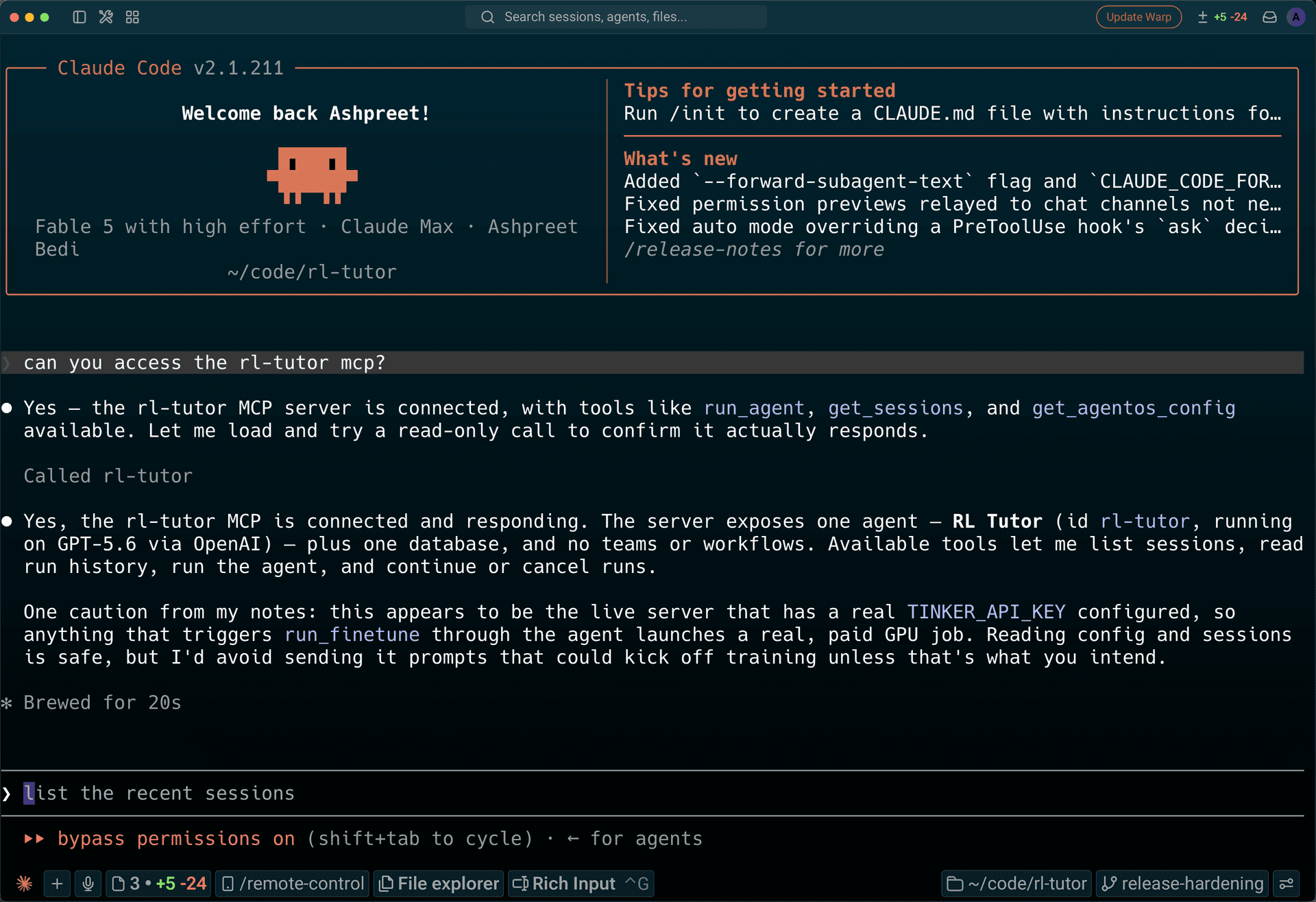
- an MCP server. Add it to Claude Code and the tutor becomes available in your coding agent.
The best part:
rl-tutorcan be added to my coding agents with 1 command, which is what im after.
Add RL Tutor to your coding agents
This is the KEY for me. Open another terminal, and run
uvx agno connect --url http://localhost:7777 --server-name rl-tutorThen open or restart your coding agent and ask: "can you access the rl-tutor mcp?"
How RL Tutor works
RL Tutor operates in two modes:
- Study mode. RL Tutor maintains a Markdown wiki inspired by Andrej Karpathy's LLM knowledge bases. Drop a link and it can convert a raw source into knowledge; ask a question and it answers from the wiki. The wiki is stored on the file system, so it can be explored using tools like Obsidian.
- Build mode. When a Tinker key is set, RL Tutor gets tools for creating datasets and running fine-tunes. It is designed to compare the tuned checkpoint with the base model and file the experiment back into its wiki.
I use RL Tutor entirely through my coding agents, because that's where I'm writing most of my code. For example, here's rl-tutor adding a doc to its wiki:
Add https://thinkingmachines.ai/news/introducing-inkling/ to the wiki
The artifacts, datasets, reports are stored locally. I can inspect everything in my editor or in Obsidian:
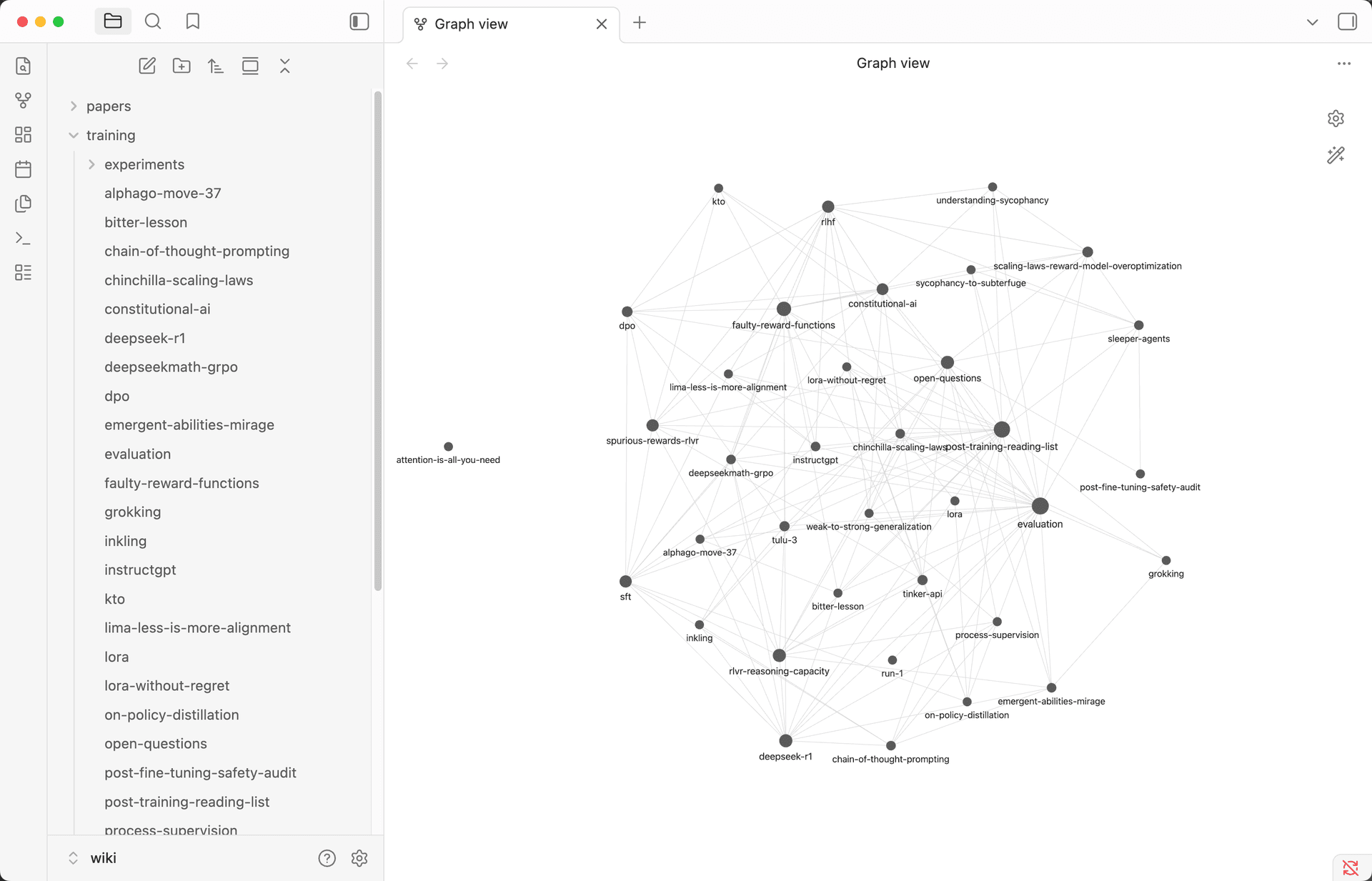
As the wiki grows, it becomes the context for the next experiment. When an experiment finishes, or fails, the report becomes another source the tutor can learn from.
Wrapping up
This was a long read, and I'm grateful if you made it this far. If you take one idea away, make it this:
The unit of work for agents is a run, the unit of state is a session, and every front-end should be a client to the same backend. To serve agents in production, we need a runtime built around this.
AgentOS is that runtime, free and open-source. You give it your agents, multi-agent teams, and agentic workflows; you get a durable, reliable and sercure API in return.
Getting started with AgentOS
AgentOS turns your agents into a production API, giving you one AI backend that serves every frontend. Getting started is as simple as giving your coding agent this prompt:
Help me set up my agent platform and build my first agent.

Clone https://github.com/agno-agi/agentos-railway.git into a folder called agent-platform,
cd in, and run the setup-platform skill (in .agents/skills/).
The prompt above uses the Railway template, but you can swap it out for your cloud provider of choice. Your agent platform runs in your cloud, as a secure and scalable service.
| Template | Deploy target |
|---|---|
| agentos-railway | Railway |
| agentos-docker | Self-hosted Docker |
| agentos-aws | AWS ECS |
| agentos-gcp | Google Cloud Run |
| agentos-azure | Azure Container Apps |
| agentos-fly | Fly.io |
| agentos-render | Render |
| agentos-modal | Modal + Neon Postgres |
| agentos-helm | Kubernetes (Helm) |
Move RL Tutor to your agent platform
The RL Tutor we served locally is just an agent plus an AgentOS. You can move it over to your agent platform with one prompt:
Move the RL Tutor into my agent platform.

Clone https://github.com/ashpreetbedi/rl-tutor into a temporary folder and read
tutor/agent.py. Copy the tutor package into my agent-platform repo, register the
tutor agent in app/main.py, and switch its SqliteDb to the platform's Postgres
database. Add its dependencies, keep the wiki directory on a persistent volume,
then restart the platform and verify the tutor answers over REST and MCP.
That's the advantage of having your own agent platform: build the foundation once, and every agent you need slots into the same runtime, storage, and connectors. The platform also comes with skills that let your coding agent create, extend, improve, evaluate, and maintain the agents running on it. I wrote about that in my Self-Driving Agent Infrastructure article.
Thank you for reading!
Ashpreet