Dash: The Data Agent Every Company Needs
Every company with 30+ people should have an internal data agent and today I'm making ours open-source: take Dash, run it in your cloud, and give your team access via Slack.
Most AI-forward companies have in-house data agents:
- OpenAI: Inside OpenAI's in-house data agent
- Vercel: d0, another post
- Uber: QueryGPT (creative name)
- LinkedIn: SQLBot (absolutely LinkedIn-coded name for the agent)
- Salesforce: Horizon Agent
- DoorDash: How to use every buzzword in a blog post
This post will show you how to build a best-in-class data system and make it available to your team over Slack. If you do this well, Dash should handle roughly 80% of routine data questions, send daily reports, and catch metric anomalies before anyone asks.
What is Dash?
Dash is a self-learning data system made of 3 agents: Dash (the team leader), a Data Analyst and a Data Engineer.
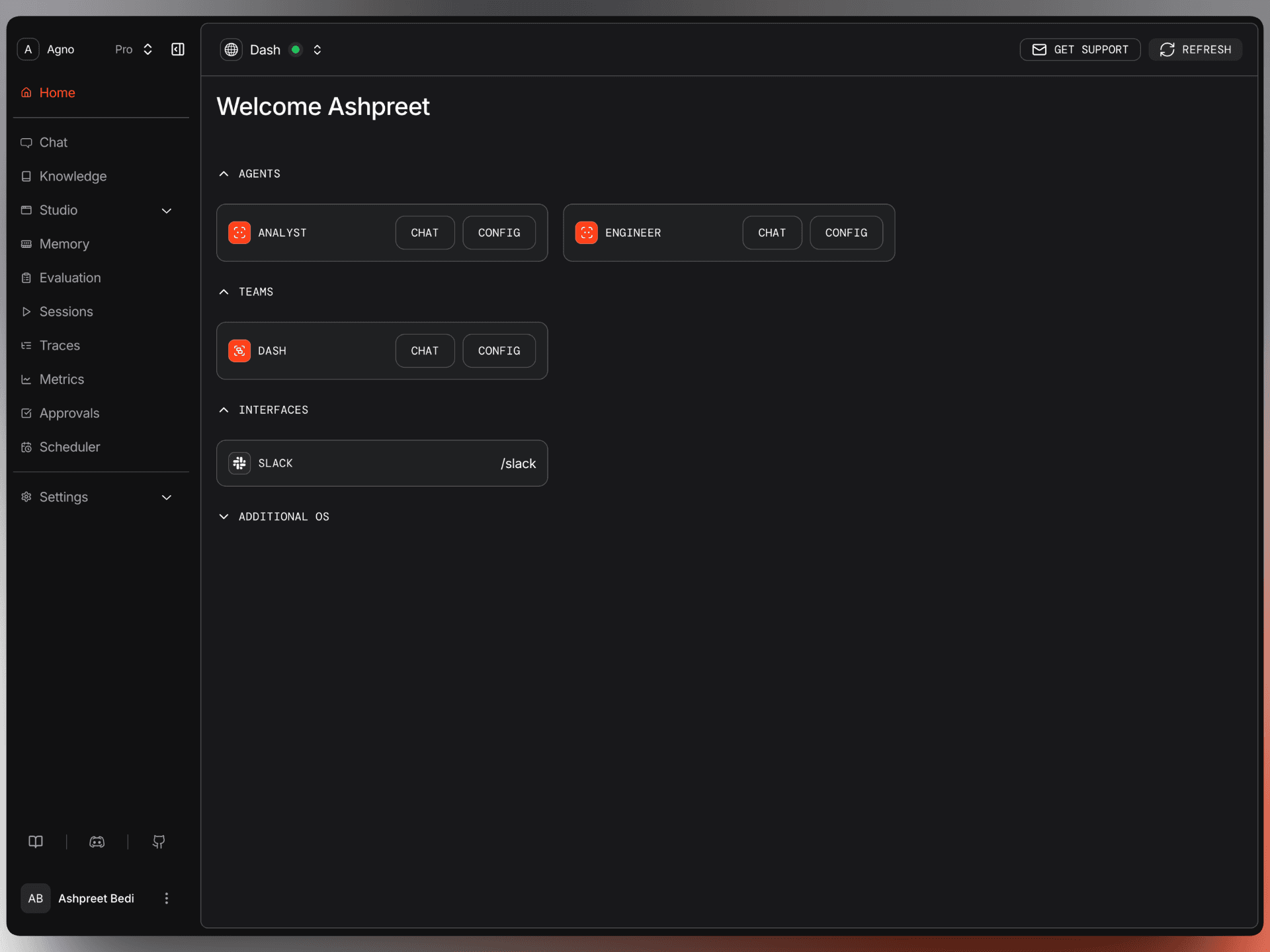
It uses a dual-tier knowledge and learning system to deliver an incredible work-with-your-data experience.
You can chat with it via Slack or the AgentOS UI.
It writes SQL, runs it, and tells you what the numbers mean. More importantly, when it makes a mistake or gets corrected, it learns from it. When your team keeps asking the same question, it builds infrastructure so the answer is faster next time.
A self-learning data system, not a data agent.
Dash uses its own PostgreSQL database. You don't point it at your production database. You progressively load the tables you want it to work with, along with the context it needs to be useful. This is the part most people skip. This is the part that makes it special.
Here's how it looks in Slack (8x speedup when waiting):
And on the AgentOS UI:
Using the AgentOS UI, you can chat with your agents, view sessions, traces, metrics, and schedules.
AgentOS is the agent platform you didn't know you needed.
How It Works
1. Context is everything
Most data agents get a schema dump and the impossible task of writing SQL from business logic that only lives in the data engineer's head. That's why they're bad. Column names and types tell you nothing about the data. They don't tell you that ended_at IS NULL means a subscription is active. That annual billing gets a 10% discount. That usage metrics are sampled 3-5 days per month, so summing them gives you garbage.
I wrote about this problem in detail in my Self-Improving Text-to-SQL Agent post. The core insight holds: the biggest improvement you can make to your data agent is giving it the same tribal knowledge that human engineers have.
Dash uses a carefully curated knowledge system backed by PgVector. It contains:
Table metadata. Table schema, column types, what they mean, what to use each table for, the gotchas. Every table ships with use cases and data quality notes. Example: status is 'active', 'churned', or 'trial'; always check against subscriptions for ground truth.
Validated queries (must have). Battle-tested SQL with the right JOINs, the right NULL handling, the right edge cases. When the Analyst gets your question, it searches knowledge first. Before it writes a line of SQL, it already knows the shape of the data and which traps to avoid.
Business rules. How MRR is calculated, what NRR means, that a customer can have multiple subscription records because upgrades close the old row and open a new one. This is the context that separates a correct answer from a plausible-looking wrong one.
This knowledge is curated by the user. What makes Dash special is its ability to learn on its own.
2. Self-learning loop
Separate from knowledge, Dash captures what it learns automatically (via tool calls). When the Analyst hits a type error and fixes it, the fix gets saved. When a user corrects a result, that correction is recorded. When the system discovers a data quirk, it notes it.
Next time anyone asks a similar question, the Analyst checks learnings before writing SQL. Dash gets better the more it's used.
I've been developing this pattern since December 2025, first as GPU Poor Continuous Learning and then refined through Dash v1. The approach is simple: the model stays frozen. The system gets smarter. Learning happens in retrieval, not in weights. It's auditable, reversible, and requires zero training compute.
3. Three agents, two schemas
Dash is three agents. Leader routes requests and synthesizes answers. Analyst writes and runs SQL. Engineer builds views, summary tables, and computed data. They work together, sharing knowledge and learnings.
The Leader has no SQL tools. It cannot touch the database.
The Analyst is read-only. Not "read-only because the prompt says so." Read-only because the PostgreSQL connection is configured with default_transaction_read_only=on. The database itself rejects writes. No prompt injection or clever jailbreak changes this. The database says no.
The Engineer can write, but only to the dash schema. A SQLAlchemy event listener intercepts every SQL statement before execution and blocks anything targeting the public schema. Your company data is untouchable.
This gives you two schemas with a hard boundary:
- public schema: your company data. You load it. Agents read it.
- dash schema: views, summary tables, computed data. The Engineer owns and maintains it.
There's also an ai schema where Dash stores its sessions, learnings, knowledge vectors, and other operational data. It powers the AgentOS UI and the self-improvement loop.
I covered the security model in depth in my Systems Engineering post. The key principle: security is a system property enforced by configuration, tested across layers.
The part nobody else has
When the Leader notices your team keeps asking the same expensive question (MRR by plan, churn by segment, revenue waterfall) it asks the Engineer to build a view.
The Engineer creates dash.monthly_mrr_by_plan. A SQL view joining the right tables, handling all edge cases, producing a clean result. Then it does the critical thing: it calls update_knowledge to record the view in the knowledge base. What it contains, what columns it has, example queries.
Next time someone asks about MRR by plan, the Analyst searches knowledge, finds the view, and queries it directly. No complex join. No risk of getting NULL handling wrong. Faster. Pre-validated. Consistent.
The agents build on each other's work. The Engineer creates infrastructure. The Analyst discovers and uses it. The Leader notices patterns and triggers the cycle. Over time, the dash schema fills with views and summary tables that nobody manually created. An analytics layer the system built for itself, shaped by what your team actually asks about.
The full loop
- You ask a question. Leader delegates.
- The Analyst searches knowledge, writes correct SQL, returns an insight.
- Good queries get saved to knowledge. Errors become learnings.
- Repeated patterns become views. Views get recorded to knowledge.
- Next time, the Analyst uses the view. Faster, pre-validated, consistent.
Dash accumulates institutional knowledge about your data and compounds with use.
Build Your Own
Dash is free and open-source. Check out the GitHub repo and follow the README for in-depth instructions.
Quick Start
git clone https://github.com/agno-agi/dash && cd dash
cp example.env .env  # Add OPENAI_API_KEY

docker compose up -d --build

docker exec -it dash-api python scripts/generate_data.py
docker exec -it dash-api python scripts/load_knowledge.py
This starts Dash with a synthetic dataset (~900 customers, 6 tables) and loads the knowledge base (table metadata, validated queries, business rules). You can demo the entire system without connecting any real data.
Connect to the Web UI
- Open os.agno.com
- Add OS → Local →
http://localhost:8000 - Connect
Connect to Slack
Dash lives in Slack. You can DM it or mention it in a channel with @Dash. Each thread maps to one session, so every conversation gets its own context.
- Run Dash and give it a public URL (use ngrok for local, or your deployed domain).
- Follow instructions in
docs/SLACK_CONNECTto create and install the Slack app from the manifest. - Set
SLACK_TOKENandSLACK_SIGNING_SECRET, then restart Dash.
Adding Your Own Data
Once you have Dash running, making it your own is straightforward. Replace the sample dataset with your data and give Dash the context it needs.
1. Load your tables into the public schema
Use whatever pipeline you already have. pg_dump, a Python script, dbt, Airbyte. Dash reads from public and never writes to it. You can use your existing workflow orchestration tools (Airflow, Dagster), or use Dash's built-in scheduler.
2. Add table knowledge
For each table, create a JSON file in knowledge/tables/:
{
  "table_name": "customers",
  "table_description": "B2B SaaS customer accounts with company info and lifecycle status",
  "use_cases": ["Churn analysis", "Cohort segmentation", "Acquisition reporting"],
  "data_quality_notes": [
    "signup_date is DATE (not TIMESTAMP) — no time component",
    "status values: active, churned, trial",
    "company_size is self-reported"
  ],
  "table_columns": [
    {"name": "id", "type": "SERIAL", "description": "Primary key"},
    {"name": "company_name", "type": "TEXT", "description": "Company name"},
    {"name": "status", "type": "TEXT", "description": "Current status: active, churned, trial"}
  ]
}
This is the single highest-leverage thing you can do. The better your knowledge, the better Dash performs.
3. Add validated queries
For your most common questions, write the SQL that gives the correct answer and save it in knowledge/queries/:
-- <query current_mrr>
-- <description>Current total MRR from active subscriptions</description>
-- <query>
SELECT
    SUM(mrr) AS total_mrr,
    COUNT(*) AS active_subscriptions
FROM subscriptions
WHERE status = 'active';
-- </query>
This is the easiest way to make sure Dash uses your internal semantics for answering routine questions. Your job is to deliver the best work-with-your-data experience for your team. This makes it possible.
4. Add business rules
Document your metrics, definitions, and gotchas in knowledge/business/:
{
  "metrics": [
    {
      "name": "MRR",
      "definition": "Sum of active subscriptions excluding trials",
      "calculation": "SUM(mrr) FROM subscriptions WHERE status = 'active'"
    }
  ],
  "common_gotchas": [
    {
      "issue": "Active subscription detection",
      "solution": "Filter on ended_at IS NULL, not status column"
    }
  ]
}
Helpful context for Dash. You can skip if it's too much work up front.
5. Load knowledge
python scripts/load_knowledge.py             # Upsert changes
python scripts/load_knowledge.py --recreate  # Fresh start
Scheduled Tasks
Dash ships with a built-in scheduler. You can schedule any type of task that your container can handle.
Out of the box, Dash comes with a pre-built schedule that re-indexes your knowledge base every night at 4am UTC:
mgr.create(
    name="knowledge-refresh",
    cron="0 4 * * *",
    endpoint="/knowledge/reload",
    payload={},
    timezone="UTC",
    description="Daily knowledge file re-index",
)
Same pattern for anything else: daily metric summaries posted to Slack, anomaly detection runs, weekly email digests, automated data quality checks. Register a schedule, point it at an endpoint, Dash handles the rest.
The best agents are proactive. Scheduled tasks are the first step in that direction.
Run Evals
Dash ships with five eval categories:
- Accuracy: correct data and meaningful insights
- Routing: team routes to the correct agent
- Security: no credential or secret leaks
- Governance: refuses destructive SQL operations
- Boundaries: schema access boundaries respected
python -m evals                      # Run all
python -m evals --category accuracy  # Run one category
python -m evals --verbose            # Show response details
Deploy to Production
You can deploy Dash to Railway with one command:
cp example.env .env.production
# Edit .env.production — set OPENAI_API_KEY

railway login
./scripts/railway_up.sh
Railway is fine for getting started. Eventually you'd want it wherever your existing data infrastructure lives. Everything is containerized so deployment should be straightforward. Be mindful of egress costs.
Production requires a
JWT_VERIFICATION_KEYfrom os.agno.com for RBAC. It would be insane to expose Dash on a public endpoint.
What's Next
Dash is built with systems engineering principles. Five layers: agent, data, security, interface, infrastructure. Each layer affects the others. Design them together and the system compounds.
If there's interest, I'll do deep dives on each layer:
- Agent Engineering: The business logic. Model, instructions, tools, knowledge, and the self-learning loop.
- Data Engineering: The context layer. Memory, knowledge, learnings, storage. Why the data layer is the most underinvested part of the stack.
- Security Engineering: Auth, RBAC, governance, data isolation, and audit trails designed into the system as core primitives.
- Interface Engineering: Turning an agent into a product. REST APIs, web UIs, Slack, MCP, and how one agent serves multiple surfaces.
- Infrastructure Engineering: How to deploy and scale Dash. Containers, deployment, scheduling.
TLDR
Every company with 30+ people should have an internal data agent. Dash is a free, open-source, self-learning data system made of 3 agents. It uses curated knowledge and continuous learning to get better with every query. Three agents (Leader, Analyst, Engineer) share knowledge and build on each other's work. Security is enforced by the system: read-only connections, schema-level isolation, eval-tested boundaries. Runs in your cloud, lives in Slack. Clone it, run docker compose up, and have the entire system running in minutes.
Built with Agno.